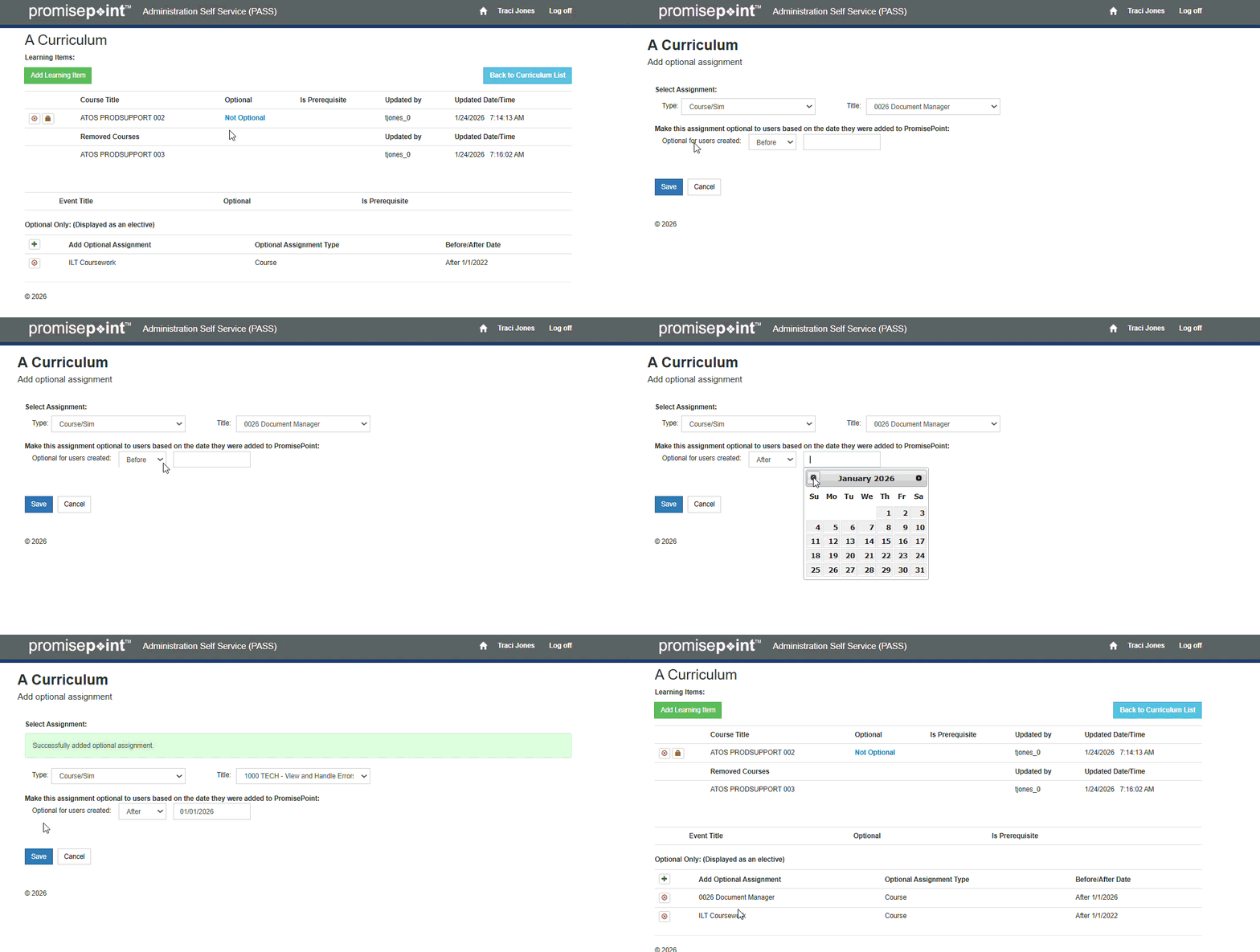
Learn how to add an optional assignment as a PASS curriculum management administrator, by watching this short video:
Video: Add an Optional Assignment
Or perform these quick steps:
- Log into PASS.
- Click Curriculum list.
- Click the number in the Assignments column to choose the curricula you’d like to add a course to.
- Click the Plus icon next to curricula you’d like to add.
- Click the Type drop-down arrow to select the appropriate assignment type.
- Click the Title drop-down arrow to select the assignment title.
- Click the Optional for users created drop-down arrow; then select your criterion.
Note: You can add the optional assignment based on when the users were added to PromisePoint.
You can add the class assignment to users either before or after they were added to a course.
- Click the Date field to select the appropriate date from the calendar.
- Click anywhere to exit the calendar.
- Click Save.
Note: Optional courses when assigned to a curriculum will be processed at 10PM & 5AM MT and added to the users curriculum.